
Inspect mode (pick a component on the page)
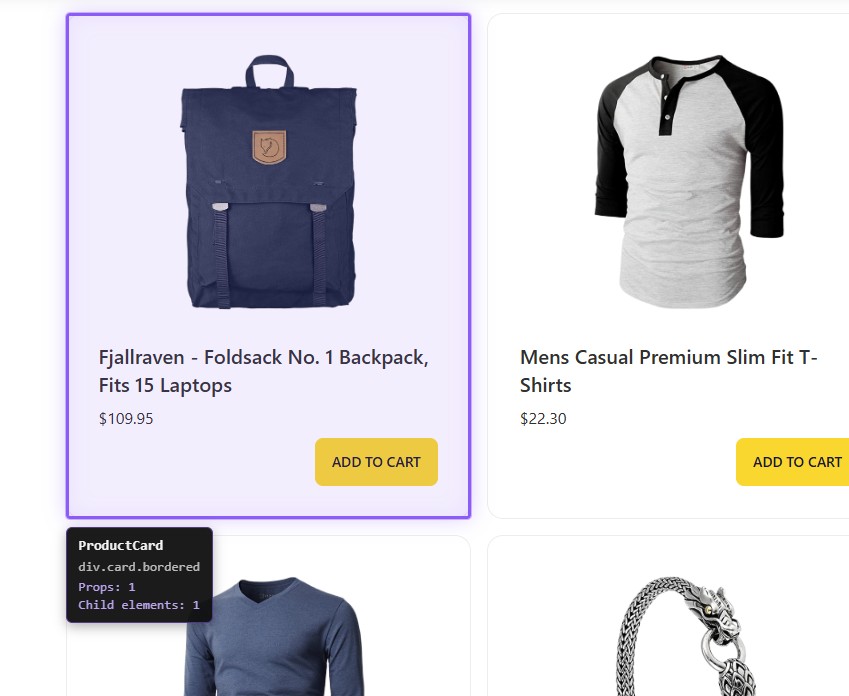
Inspect on the Props tab lets you pick UI on the page and, after click, narrow the component list to the subtree tied to that node — similar to picking an element in browser DevTools, but the result is filtering the Props table, not opening the DOM tree.
Overview: Props overview.
Start and stop
The Inspect control (pointer icon) lives on the Props toolbar and enables picking an element to filter components.
Before activation the component list refreshes so the tree matches the page.
By default Inspect temporarily hides the inspector overlay so it does not cover the page. Change this under Options → Inspect Mode → Hide overlay while inspecting.
Clicking Inspect again stops picking without clearing an applied filter.
Escape cancels picking without selecting.
Switching tabs or closing the panel resets pick mode.
On-page behavior
With Inspect, pointer moves and clicks are handled above normal page behavior, including elements that usually ignore clicks.
Selection binds to the nearest DOM node linked to a Vue instance.
While moving the pointer, the element under it highlights and a tooltip may show:
- component name;
- root element summary (tag, class fragment or
id); - props count;
- nested component count.
Tooltip light/dark follows inspector theme.
Vue Inspector UI (overlay, chevron, Inspect helpers) is excluded from picking.
If Hide overlay while inspecting is on, the UI returns after pick or cancel.
After you pick
When a page element is chosen:
- Inspect mode ends;
- the Props table keeps components for that root subtree;
- a Filtered chip shows the list is scoped.
Click Filtered to clear the filter and reload the full list.
Starting Inspect again with a filter active lets you pick another root and replace the scope.
Limits and notes
- If there is no Vue-related node under the cursor, selection may not filter.
- Deep DOM may resolve to the nearest component, not the visually expected level.
- Inspect only affects the component list; favorites, blacklist, and search still apply on top.