
Auto run
Extension only (Chrome / Edge). The Auto Run block in Options → General is hidden in standalone: a bookmark has no background extension process to decide when to show the panel.
Auto Run controls when the overlay pill appears on sites in overlay mode. This is not the component blacklist on Props — here we only filter site origins (scheme, host, port).
Basics
Rules inspect the page origin (address bar host, no path). You can enter a full URL such as https://app.example/ or a pattern like *localhost* where * matches any substring. Empty lists impose no restriction until you add rows (or enable whitelist mode, below).
The overlay still won’t inject on pages the extension treats as static without Vue (separate heuristic). Lists don’t bypass that — see the extension popup section.
Site Blacklist
Site Blacklist — origins/patterns where the pill must not auto-show.
- Add via input + Add (or Enter).
- Table shows pattern and added date; select a row to edit in the side panel.
- If the current origin matches any blacklist row, auto-run overlay is off for that tab.
Blacklist can combine with whitelist: whitelist is evaluated first when active and non-empty.
Site Whitelist and “whitelist mode”
Enable whitelist mode activates Site Whitelist.
- While the whitelist is empty, mode is effectively open — only blacklist (if any) applies.
- Once the whitelist has at least one row, auto overlay is only allowed on matching origins; everything else is denied before blacklist trims further.
So a non-empty whitelist defines “where yes”, blacklist subtracts exceptions.
Extension popup — escape hatch
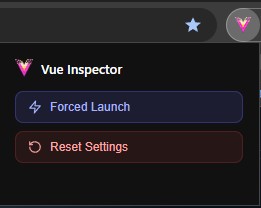
The extension icon popup exposes two actions (UI labels in English: Forced Launch, Reset Settings).
Forced Launch injects the inspector on the active tab, ignoring Auto Run lists and the static-site heuristic. Use when lists block all sites or Options is unreachable.
Reset Settings performs a full wipe of saved inspector settings (Auto Run, theming, favorites, etc.). Last resort if configuration locks you out — there is no undo without a backup export.
If you rely on a strict whitelist, keep at least one URL you use to open Options, or remember Forced Launch / Reset Settings.