
Breakpoints and mock responses
The Network tab and Options → Network provide two interception mechanisms:
- Breakpoint — pause an outgoing request before it hits the network, edit parameters, then continue;
- Mock response — return a crafted response without calling the server.
Both apply only to fetch and XMLHttpRequest on the current page.
You can suspend all breakpoint rules or all mock rules globally from the Network toolbar or via Enable breakpoint rules / Enable mock responses in Options → Network — rules remain saved but are not applied until re-enabled. See Working with requests.
General interception limits (page context, CORS, scope) are described in Working with requests.
Breakpoints
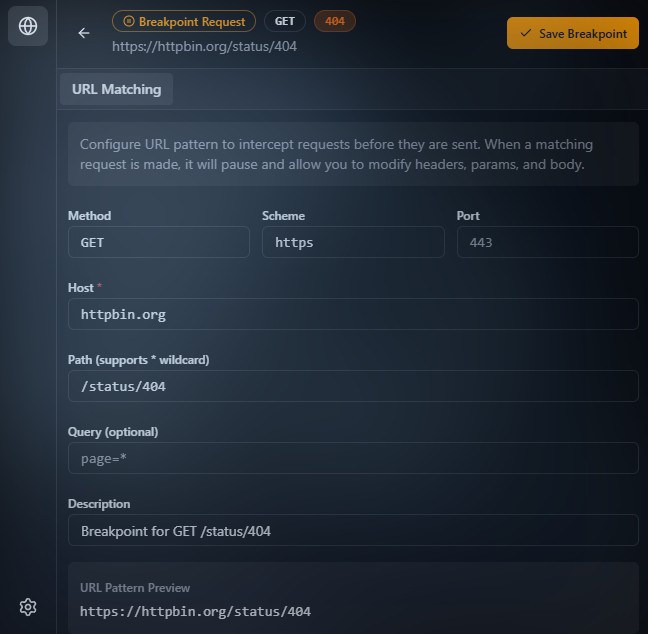
Purpose
A breakpoint pauses an outbound request before it is sent.
When URL and method match the rule:
- the request is held;
- the UI lets you edit parameters;
- after confirmation the request continues with your changes;
- or you can cancel.
Interception happens after the app built the request but before native send.
What you can change
Before continuing you can edit:
- HTTP method;
- URL (scheme, host, path, query);
- headers;
- body.
After Apply the request goes out in the modified form.
Request body: raw and form-data (breakpoint)
For the paused request, the body editor can use Raw (single text area) or Form-data (rows analogous to the read-only Network details table).
Form-data mode
In Form-data mode, each row contains:
- a key;
- a value type (Text or File);
- the value.
For File rows, Browse lets you pick a file from disk. The chosen file is added to the draft, typically as a data: URI.
File sources for File fields
For File rows, the dropdown lists:
- Original — restore the file that was already part of this request (equivalent to the original
(binary)for as long as the current pause still has the originalFormData); - Saved Files entries under Options → General;
- wallpapers (background media) from Customize — same shared media store as panel styling.
Auto-saving files selected via Browse
Auto-save new files selected via Browse (Options → General → Saved Files) controls whether files picked in this editor are auto-saved.
When the option is on:
- the file is copied to Saved Files;
- that happens only if there is not already an entry with the same name + size pair.
Storage limits follow Customize:
- the extension uses IndexedDB;
- standalone enforces a 30 MB cap.
How data is applied after you continue
After you continue, the injected script builds a new FormData object:
- text values are appended as normal fields;
data:values are turned into file parts;(binary)restores the original File from the captured request for as long as that source data is still available.
File restoration limits
If the value is still:
- a
blob:URL; - or a
__fileId:… reference,
the page cannot recover the file contents on its own.
In that case an empty placeholder is sent for that part and the console emits a warning.
To avoid that, pick the file again with Browse or select a saved file from the list.
Where to configure
- Network — create or adjust a breakpoint from a captured request.
- Options → Network → Breakpoints Requests — manage the rule list.
- Network toolbar (breakpoint icon) or Enable breakpoint rules in Options — turn all breakpoint handling on or off without deleting rules (see Working with requests).
Behavior
When a request hits an active breakpoint rule the UI focuses editing:
- the breakpoint card opens;
- the view may switch to Network;
- a collapsed inspector iframe expands automatically.
Until you confirm or cancel, the request stays paused.
Mock responses
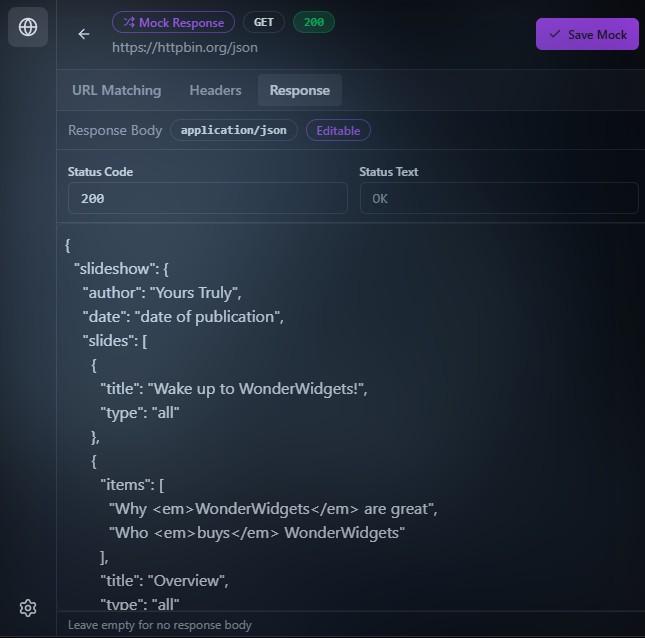
Purpose
Mock fully replaces a network call with a local response.
When a rule matches:
- no server round-trip;
- a synthetic response is built;
- the page receives it like a normal HTTP response.
What a mock can set
- status and statusText;
- headers;
- body;
- delay before resolving.
Where to configure
- Network — create or adjust from a request row.
- Options → Network → Mock Responses — manage rules.
- Network toolbar (mock icon) or Enable mock responses in Options — turn all mock handling on or off without deleting rules (see Working with requests).
Behavior
If mock matches:
- the real request is not sent;
- breakpoint does not apply for that call.
Order of evaluation:
- mock first;
- if no mock — breakpoint;
- otherwise normal network.
Mock wins over breakpoint.
Breakpoint vs mock
| Mechanism | Network round-trip | Can change request | Can change response |
|---|---|---|---|
| Breakpoint | Yes | Yes | No |
| Mock response | No | No | Yes |
Limits
Both work only for:
- fetch
- XMLHttpRequest
Not intercepted:
<img>,<script>,<link>loads;- service workers outside this layer;
- native browser calls outside page JS.
OPTIONS (preflight) requests are not part of interception.
Compared to Charles Proxy
Charles (and similar system / external proxies: Fiddler, mitmproxy, …) sits between client and server at the OS or app level:
- sees traffic beyond the browser (mobile apps, CLI, other tools if proxied);
- HTTPS typically needs a trusted root and SSL Proxying (TLS termination);
- Breakpoints and Map Local / Remote apply to all matching connections on that channel.
Vue Inspector runs inside the browser tab: it patches fetch and XMLHttpRequest.
| Aspect | Charles (typical) | Vue Inspector |
|---|---|---|
| Level | Proxy / out-of-process | JS in the page |
| Scope | Many clients, HTTP(S) through proxy | This document only: fetch and XHR |
| HTTPS | Custom trust, TLS break | No extra TLS break — the app already sees responses in JS |
| SW / native requests | Often visible on the path | Not covered here |
| SPA convenience | Proxy + certs setup | Enable rules in the inspector for the current site |
In intent, Inspector breakpoints/mocks resemble Charles (pause / fake a response); in placement it is a page-level devtool, not a network proxy.